Chrome extension guide
How to use The Cringe on WhatsApp Web
Add The Cringe to Chrome, open web.whatsapp.com, open a 1-on-1 chat, click ⋮ and pick Analyze with The Cringe. You get message counts, reply times, who texts first and an AI read of the chat. No export needed. Here is every step, with the real screens.
Add The Cringe to Chrome
Open The Cringe in the Chrome Web Store and click Add to Chrome, then Add extension. It takes a few seconds and there is no account to create.
Then pin it: click the puzzle icon at the top right of Chrome and click the pin next to The Cringe. The green face icon now stays in your toolbar, one click away.
It works in Chrome, Microsoft Edge and Brave on Windows, Mac, Linux and ChromeOS.
Open WhatsApp Web and log in
Go to web.whatsapp.com in the same browser. If you see a QR code, open WhatsApp on your phone, go to Settings (or ⋮ on Android), then Linked devices and Link a device, and scan the code.
Wait until your chat list shows. The Cringe uses the WhatsApp Web you are already logged into. It never asks for your password or your phone number.
Start an analysis
There are two ways to start. Both give the same report.
From the chat menu (fastest). Open the chat you want to read. Click ⋮ at the top right of the chat, then Analyze with The Cringe. A panel opens on the right side of WhatsApp Web.
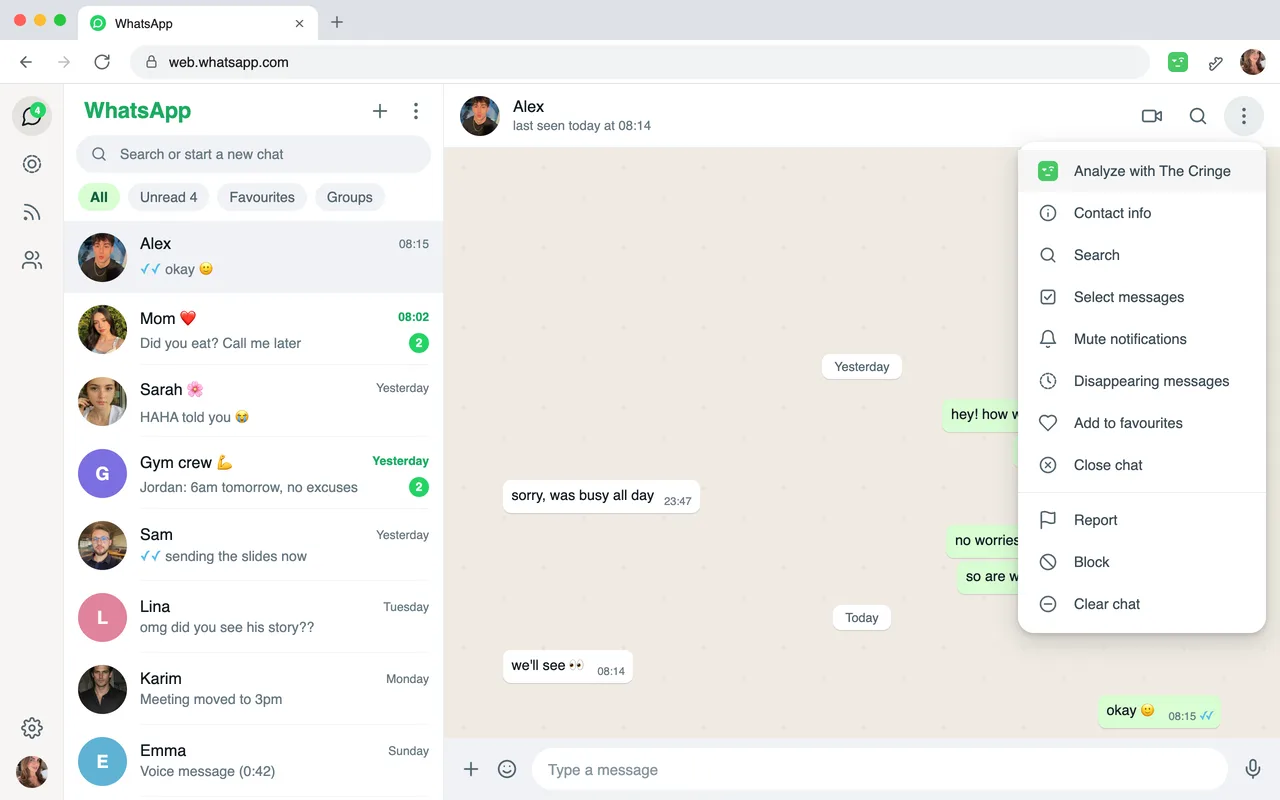
From the toolbar icon. Click The Cringe icon at the top right of Chrome. You see your chats. Search or scroll, then click the one you want.
The menu item is missing? Reload the WhatsApp Web tab once. Chrome only adds extensions to pages loaded after you install them.
Say who the person is
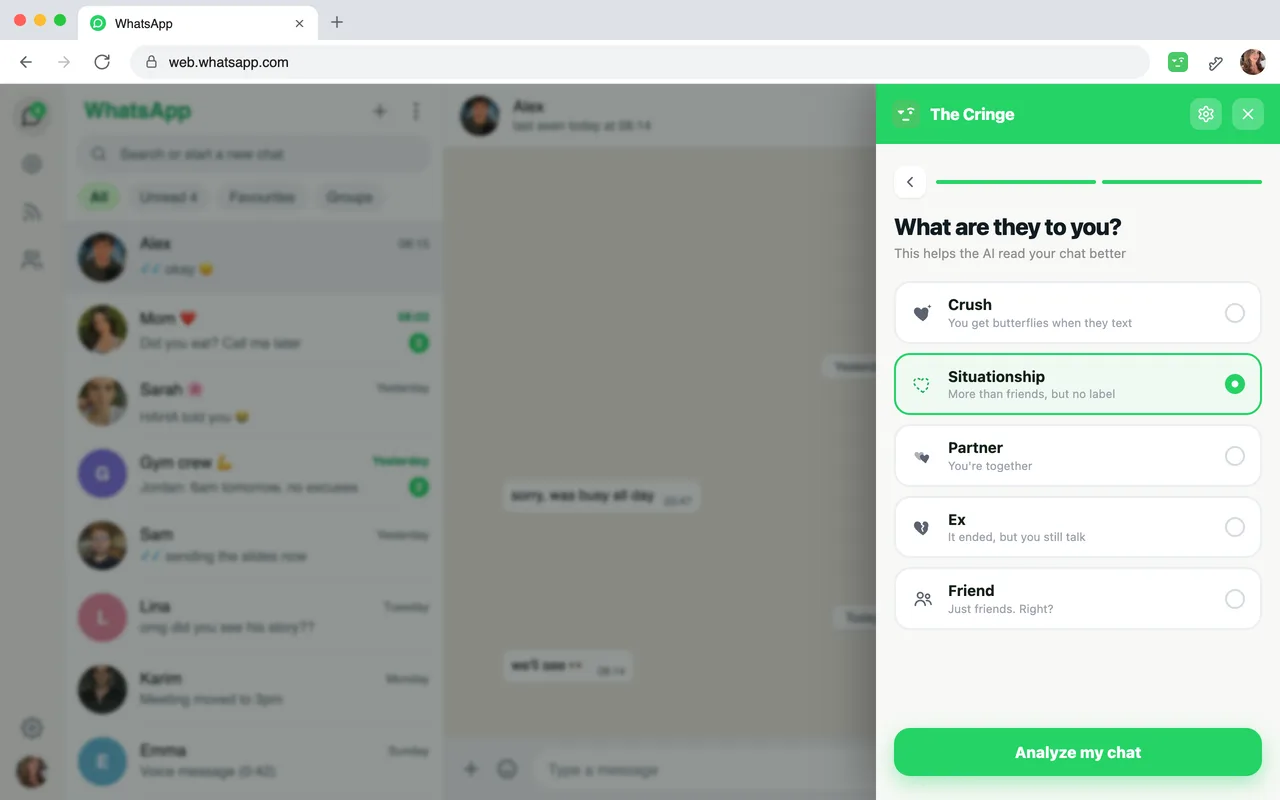
Pick who you are texting (a girl, a guy or other), then what they are to you: crush, situationship, partner, ex or friend. The AI reads the same messages differently for a crush and for a friend, so this makes the report fit your story.
Read your report
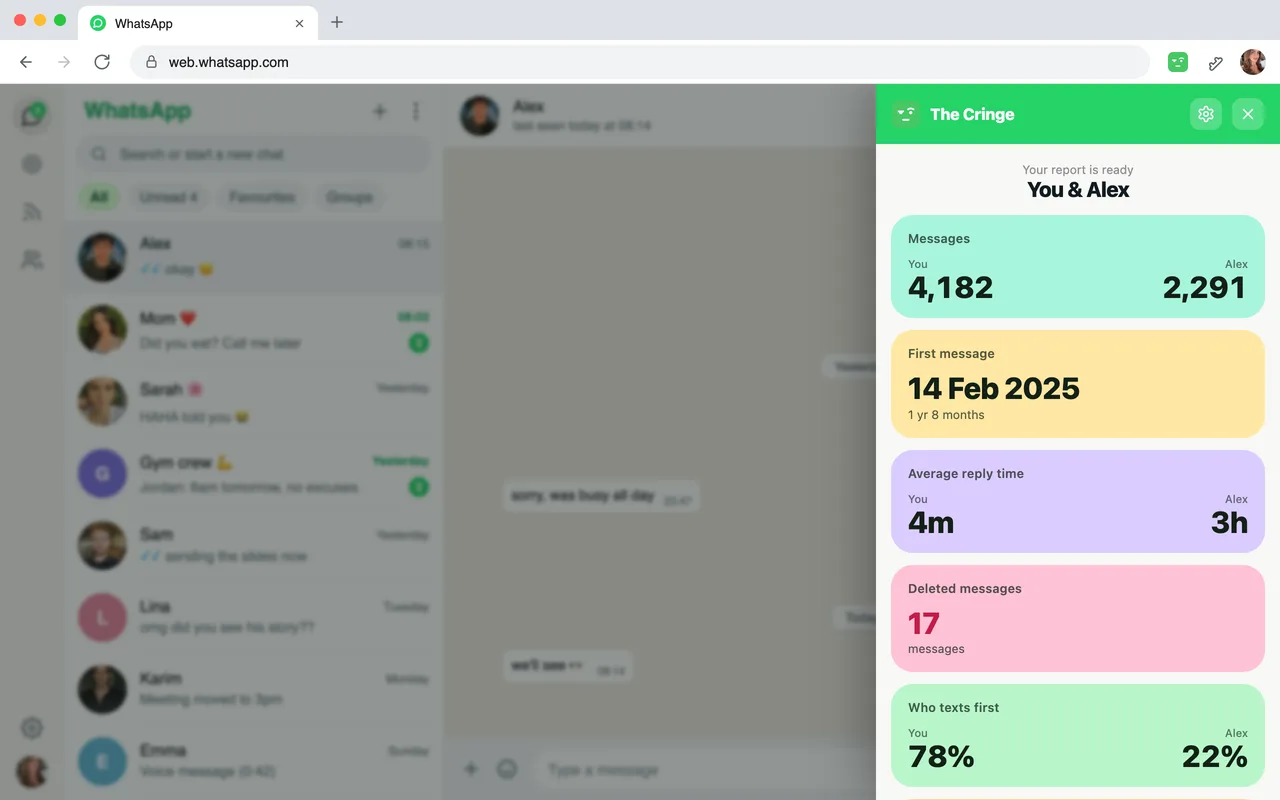
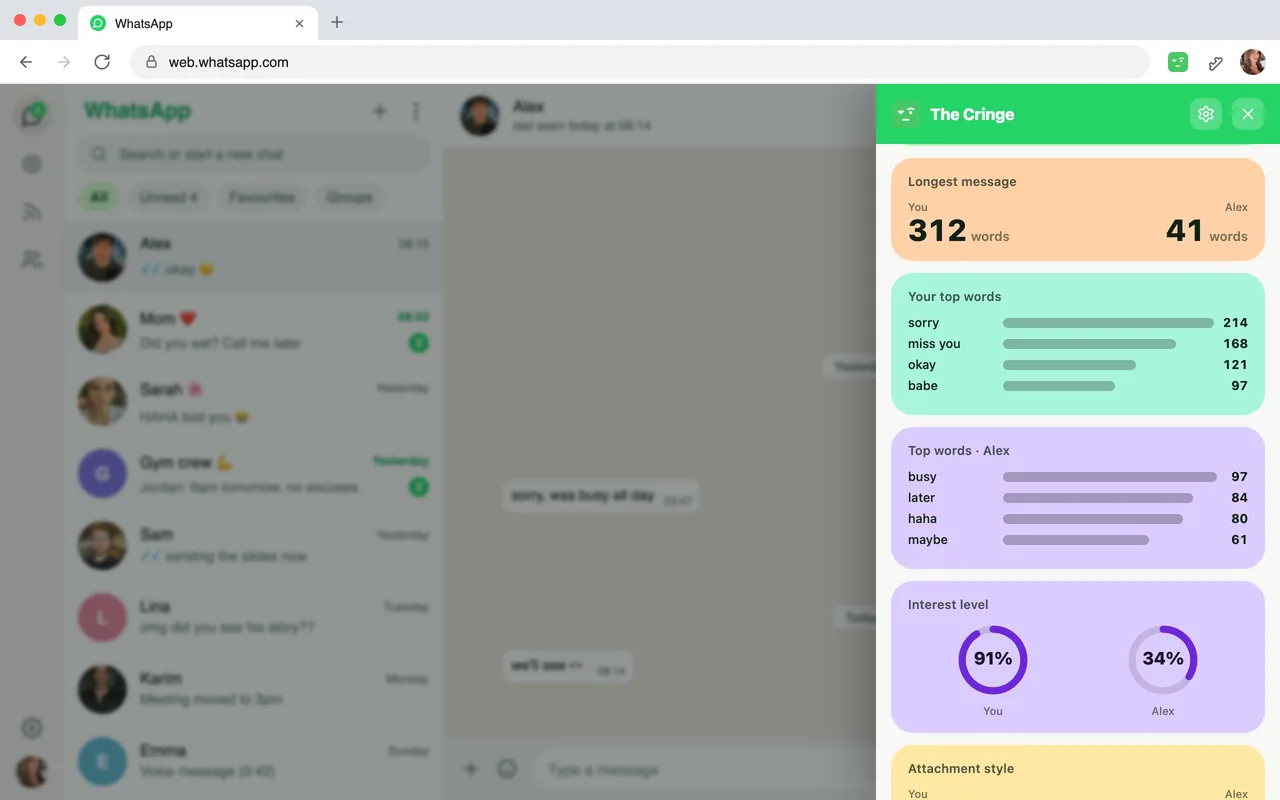
The Cringe reads the whole chat in your browser and counts everything: messages each of you sent, when you first talked, average reply time, deleted messages, who texts first, the longest messages and your most used words.
Free
Both message counts.
Your own side of the other stats, like your reply time.
Small chats (under 2,000 messages): the first two cards.
Premium
Their side of every stat.
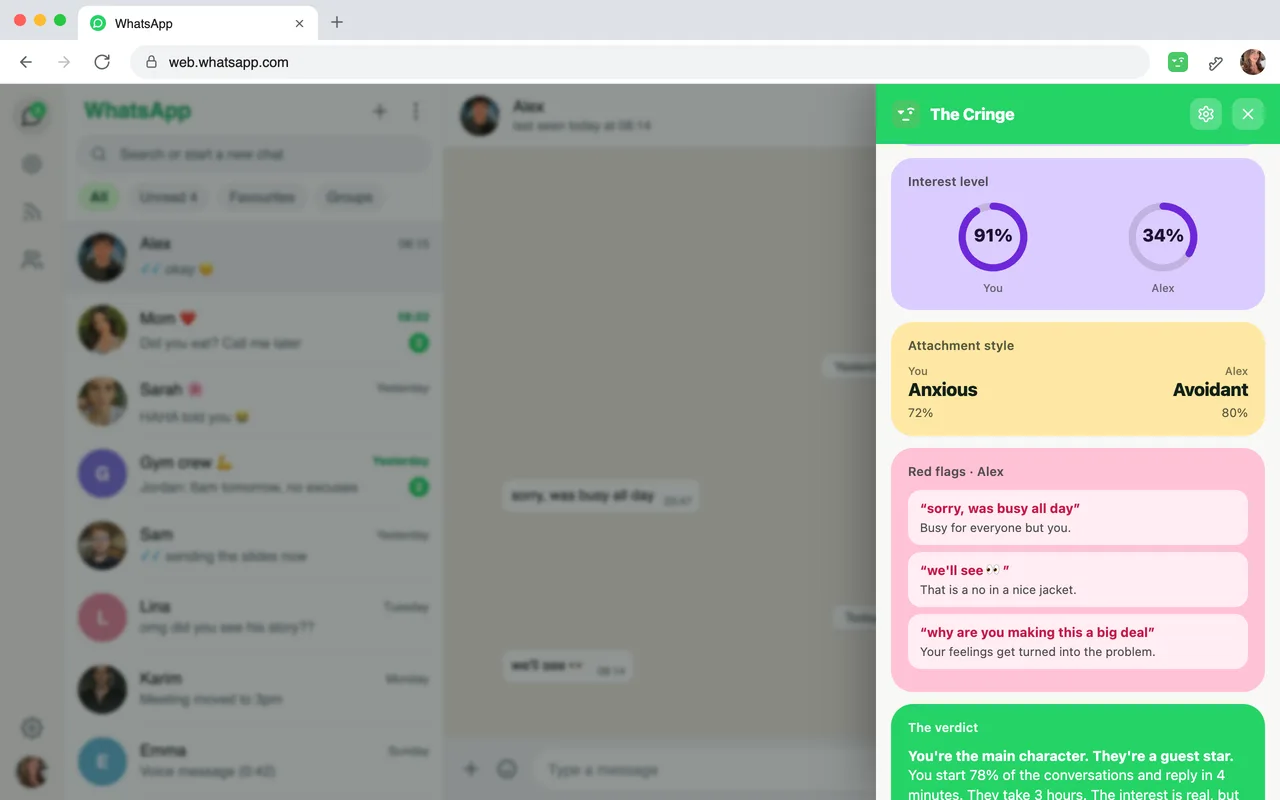
Interest level and attachment style for both of you.
Red flags quoted from your chat, and the final verdict.
Unlock the AI insights
Tap any locked card or the Unlock bar. You see the plans and the price for your country before you pay. You pay on Stripe's secure checkout page. Cancel anytime from settings.
Once paid, the report opens by itself: your interest levels, your attachment styles, the lines the AI flags in your own chat, and the verdict.
Already Premium on thecringe.app? Open settings (the gear at the top right of the panel), click Log in and enter the email you used at checkout. We email you a 6-digit code. Your plan works in the extension and on the website.
Change the language and settings
Click the gear at the top right of the panel or the popup. There you can change the language (15 languages, including Español, Français, Português, Deutsch, Italiano, Türkçe and العربية), manage or cancel your subscription, log in or out, and chat with us.
The report is written in the language you pick, even if your chat is in another one.
If something goes wrong
“Open web.whatsapp.com first”
There is no WhatsApp Web tab open. Click the button in the message, or open web.whatsapp.com yourself, then click The Cringe again.
“WhatsApp is open in another tab or window”
WhatsApp Web only works in one tab at a time. Go to the tab that says so and click Use here, then try again.
“WhatsApp is still loading”
Wait until your chats show, or reload the WhatsApp Web tab. Old or very long chats can take a few seconds more.
No “Analyze with The Cringe” in the menu
Reload the WhatsApp Web tab once after installing or updating the extension. You can always start from the toolbar icon too.
“Group chats are not supported”
The Cringe compares two people. Open a 1-on-1 chat instead.
On a phone, Safari or Firefox
The extension needs Chrome, Edge or Brave on a computer. On any other device, export the chat and analyze it on the web.
Still stuck? Write to support@thecringe.app or use the chat bubble on any page of thecringe.app. Add the error code you see in the extension, it helps us a lot.
What happens to your messages
The stats are counted on your computer. Message counts, reply times, who texts first and the rest come from the chat you open, inside your browser.
The AI part needs our server. For the AI report, a sample of messages is sent to our server for the analysis. Phone numbers, emails and links are removed before it leaves your computer. Names are not removed, so the AI can tell who said what. The sample is used for that one analysis and is not stored.
The extension only reads the chat you choose to analyze, and the other person is never told. Read the full privacy policy.
Questions about the extension
How do I analyze a WhatsApp Web chat?
+
Add The Cringe to Chrome, open web.whatsapp.com on your computer and log in. Open a 1-on-1 chat, click ⋮ at the top right of the chat and pick “Analyze with The Cringe”. Say who the person is and what they are to you, and your report shows up in a few seconds.
Is the extension free?
+
Adding it is free and you see a report right away. Both message counts are free, and on locked cards you see your own side. Small chats (under 2,000 messages) show their first two cards free. Their side of the stats and the AI report (interest level, attachment style, red flags and the verdict) are Premium.
Do I need to export my chat?
+
No. The extension reads the chat you pick straight from WhatsApp Web, in your own browser. There is no file to export or send.
Does the other person know I analyzed our chat?
+
No. Nothing is sent to them and WhatsApp does not show anything.
Does it work on my phone?
+
No. Chrome extensions only run on computers, in Chrome, Edge, Brave and other Chromium browsers. On a phone, export the chat and use the web analyzer at thecringe.app/analyze.
Does it work with group chats?
+
No. The Cringe compares two people, so it works with 1-on-1 chats only.
I already pay on the website. Do I pay again?
+
No. In the extension, open settings (the gear) and log in with the email you used at checkout. We send you a 6-digit code and your Premium works there too.
What happens to my messages?
+
The stats are counted on your computer. For the AI report, a sample of messages is sent to our server for the analysis and is not stored. Phone numbers, emails and links are removed before it leaves your computer. Names are not removed.
Ready to see what your chat says?
One click from any WhatsApp Web chat. Your first report shows in seconds.
Want the overview first? See what the extension does